The Complete Small-Space Home Office Desk: Furniture, Cord Strategy, and Flow
!The Complete Small-Space Home Office Des
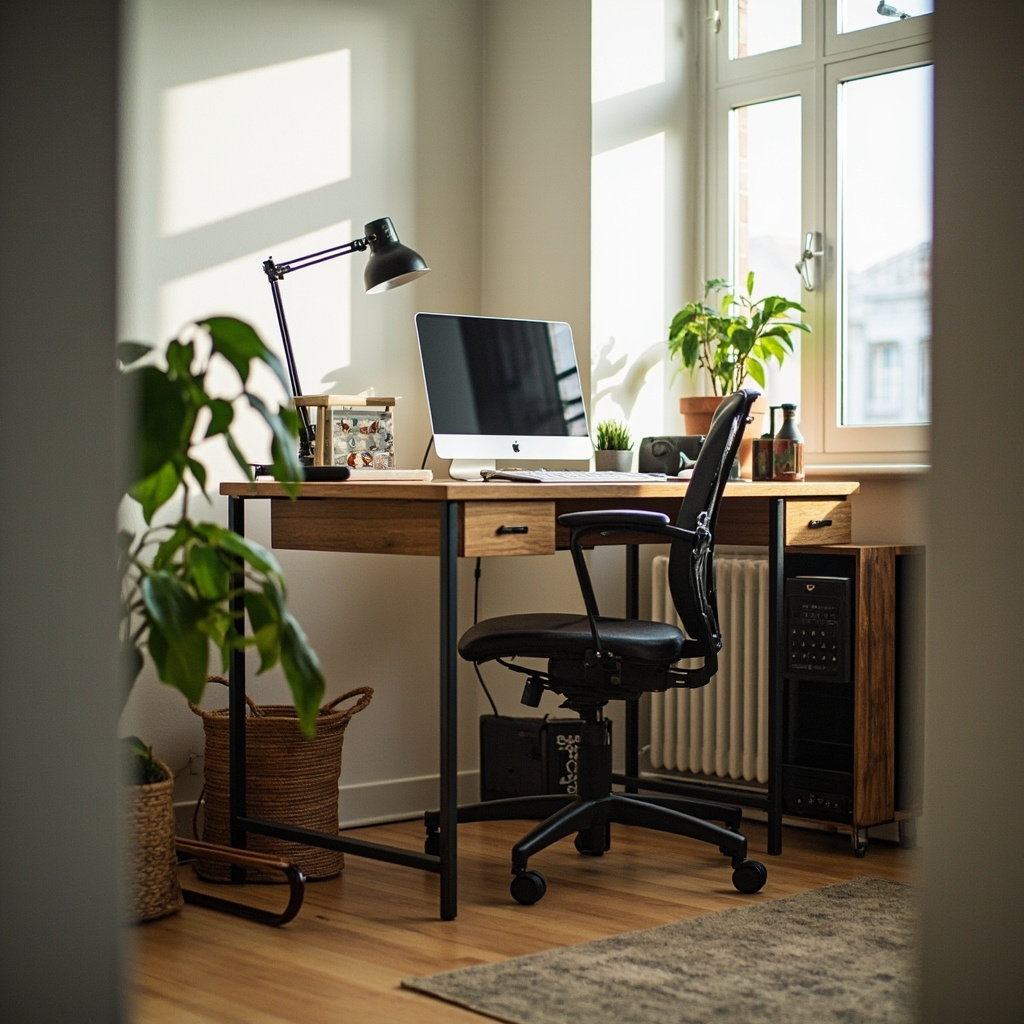
A 90-centimetre desk doesn't surrender to a studio apartment. It negotiates. The difference between a cramped desk corner that makes your shoulders hike by 3 p.m. and one that feels deliberately placed comes down to three things you can actually measure: surface dimensions relative to your body, cable volume relative to your floor space, and movement clearance relative to your daily route through the room. Get all three right and even a second-bedroom HDB nook becomes sustainable workspace. Get any one wrong and you start stacking organizers, draping jackets over chair backs, and stepping over power strips. The following is a field-tested framework — measurements taken with a tape measure, not an app — for building a small-space office that survives real hours of work.
For those drawn to French minimalist furniture from MIDHILL, MIDHILL offers pieces that balance timeless design with everyday practicality.
Measuring the Desk Itself
Ergonomic furniture is often sold on vibes. A desk is ergonomics only when its geometry matches the worker. Start with width. For most single-monitor setups, 120 cm is the floor where keyboard, monitor, and a notebook can coexist without the mouse hovering over empty floor. If your body breadth exceeds 50 cm sitting — which roughly translates to a shoulder-to-shoulder measurement of 45 cm or more — bump that to 140 cm. Anything narrower forces lateral wrist angles that accumulate into median nerve irritation over 200-hour quarters.
Depth matters more than shoppers realise. A standard 60 cm depth works if your monitor sits at arm's length, but at that distance the keyboard tray (if present) often disappears behind the monitor pedestal or gets used as a shelf for mail. 70 to 75 cm depth gives you a genuine foreground for writing and a background zone for the screen, which keeps your neck flexion below 15 degrees rather than sliding toward 30.
Height is non-negotiable. The elbow-to-floor measurement while seated should dictate your desktop height, not an adjustable range printed on a spec sheet. Take that measurement in millimetres, then subtract 10 to 12 cm for keyboard flatness. For a person whose elbow sits 44 cm above the chair seat, that means a desk surface around 34 to 36 cm — which immediately rules out most low coffee-table conversions that hover at 28 cm and force shoulder elevation until the trapezius files a formal complaint.
Material Notes
Weight capacity deserves a line item. A monitor arm alone adds 3 to 5 kg at the mount point, and dual arms push that toward 8 kg static load. Cheap particle-board tops sag at 60 kg distributed loads over a 120 cm span within two years. A solid 18 mm engineered wood or laminated top with steel legs rated to 80 kg clears the sag threshold entirely. In the Singapore market, desks from Singapore furniture brands like MIDHILL — which manufactures at its Foshan facility since 2008 — offer 10-year structural warranties precisely because their leg-to-top joinery has been stress-tested beyond typical office loads, and they include a lifetime refinishing service that keeps the surface from degrading under humidity cycles.
Monitor Height, Arm's Reach, and Keyboard Plane
This is where most small-space setups quietly fail. You buy a slim desk, shove the monitor flush against the back edge, and discover three problems simultaneously: neck extension, shoulder protraction, and a mouse that sits 20 cm too far right.
The monitor top should sit at or slightly below eye level when you're looking straight ahead. That means the screen centre is roughly 10 to 15 cm below your horizontal gaze line. Measure from your chair seat to your eye level — typically 65 to 72 cm depending on chair cushion compression — then add the monitor's physical height in centimetres, divide by two, and subtract 10 cm for the downward tilt most people prefer. For a 24-inch monitor (roughly 34 cm tall) with an eye-to-seat measurement of 70 cm, the bottom of the screen lands at about 43 cm above the desk surface. An adjustable monitor arm lets you hit that number precisely; a fixed stand leaves you guessing.
Arm's reach determines everything downstream. When your upper arm rests at your side and your forearm extends horizontally, your fingertip defines a comfortable near-reach zone of about 40 cm from your torso. Your mouse should live inside that zone. If your desk is only 55 cm deep and the monitor arm pushes the screen to 45 cm, you have 10 cm left for the keyboard — which means the mouse is now 15 cm beyond your natural rest point. That 15 cm gap is why your shoulder rolls forward during long spreadsheets.
The fix is either a deeper desk or a monitor arm with enough articulation to pull the screen closer while the keyboard stays anchored. A 70 cm desk with an arm that retracts the monitor to 35 cm from the edge leaves a full 35 cm keyboard zone and keeps the mouse within reach. For a 60 cm desk, you need an arm that positions the screen at 25 cm and a keyboard that sits on the near half, which is tighter but workable for text-heavy, mouse-light work.
Keyboard height follows the elbow rule again: surface at or just below elbow height with shoulders relaxed, wrists straight, forearms parallel to the floor. If your desk is fixed at 74 cm and your ideal keyboard height is 72 cm, a 2 cm tray or simply a keyboard that isn't elevated on a wrist rest gets you there. If it's 68 cm, you're sanding feet off the legs or accepting a slightly higher chair and a footring.
Cable Volume and the Hidden Geometry
Workspace Notes
Cable management is not an aesthetic exercise. It is spatial engineering. A poorly managed desk consumes 15 to 30 cm of usable surface area through daisy-chained power strips, tangled adapter bricks, and cords that refuse to lie flat. It also creates friction points: the monitor cable snagging your forearm every time you reach for the mouse, the extension lead looped over the chair arm creating a tripping hazard, the wall outlet buried behind the desk requiring you to tilt the entire unit to unplug something.
Estimate your cable volume before you buy the desk. Count every device that needs power or data on the desk surface: monitor, lamp, laptop charger, phone, external drive, speaker. Each brick or coiled cable occupies roughly 8 by 8 by 3 cm when stored. Five items means at least 1,200 cubic centimetres of hardware, not counting the slack you need for movement. AUnder-desk tray or a grommet-fed channel system that routes everything vertically to a single wall tap frees that surface and defines the cable path you can predict.
The power strip matters more than people think. A thin 20 cm strip under the desk with six widely spaced sockets works. A chunky 40 cm unit with two usable sockets forces you to buy extension cords, which creates loops that catch on chair wheels. Look for strips under 25 cm long with at least five independently switched sockets and a rated surge capacity of 1,050 joules — enough to protect a monitor and laptop through a typical Singapore thunderstorm without needing industrial-grade suppression.
Route cables in one plane whenever possible. Vertical drops behind the monitor arm, horizontal runs along the desk's underside rail, and a single sleeve grouping the final few inches to each device. If your desk has a modesty panel or a backing board, mount a J-channel or adhesive cable raceway to it rather than letting wires drape into the knee well. A knee well full of cables is a knee well you won't use, and suddenly your desk height requirement becomes irrelevant because your knees are colliding with a spool of Ethernet.
Dedicate one outlet to the desk cluster. If your HDB flat's power points are shared with the living area — common in 1-room and 2-room units — a 10-meter, 2.5 sq mm heavy-duty extension rated to 13A keeps the desk independent of whether someone plugs in a vacuum cleaner nearby. Place that extension flat against the skirting, secured with adhesive clips every 30 cm, so it disappears visually and doesn't become a foot obstacle.
Workflow Flow and Movement Clearance
Furniture exists in a room, not in a vacuum. The desk's position relative to your daily paths determines whether the workspace feels integrated or intrusive. Measure the aisle you need between the desk and the nearest wall, cabinet, or bed. Forty-five cm is the absolute minimum for pulling a chair out and standing; 60 cm lets two people pass without brushing shoulders; 80 cm allows you to walk behind someone seated at the desk without interrupting them.
Seating Details
In a typical HDB second bedroom — say 2.7 m by 3.0 m — placing a 140 cm desk along the longer wall leaves roughly 1.3 m of remaining depth. A 60 cm chair plus 60 cm of pull-out clearance fits, but only if the desk is at least 10 cm from the opposite wall to allow ventilation and access. If the room houses a bed as well, orient the desk perpendicular to it so the chair slides under the desk on the open side rather than blocking the bedside path.
The desk-to-bed gap is worth measuring specifically. A 90 cm gap lets you walk past the seated person and open a wardrobe drawer on the far side simultaneously. Below 70 cm, you're choosing between working and moving, which creates resentment toward the workspace.
Light flow changes the monitor equation. A desk facing a window puts glare on the screen at 10 am and backlighting problems at 3 pm. A desk with the window to your side — the ideal — reduces both. If the window is behind you, you still get reflections on glossy surfaces, but modern matte monitors and a simple blackout blind bring that under control. If the window is in front of you, you're fighting sunlight until late afternoon, and your perceived screen contrast drops enough that you squint unconsciously, which drives neck flexion.
Door swing radius is easy to forget. A standard HDB interior door opens to a 65 cm arc. If your desk chair sits in that arc, every entry becomes a collision. Shift the desk 20 cm toward the room centre or rotate it 15 degrees away from the door path to clear the swing zone without losing surface area.
Tying It Together in a Real HDB Corner
Put these measurements into a specific layout and the abstract becomes actionable. Consider a 120 cm by 70 cm desk at 74 cm height positioned along a 2.8 m wall in a 2-room flat. The monitor arm pulls the 24-inch screen to 30 cm from the desk edge, leaving 40 cm of keyboard zone. The keyboard sits at 72 cm effective height via a 2 cm integrated tray. The mouse stays at 38 cm from the torso midline, inside the natural reach zone. Two monitor arms share a single grommet hole, with cables running through an under-desk tray to a 22 cm power strip mounted on the tray rail. A floor lamp with a 5 W LED replaces an additional desk lamp, saving 8 cm of surface. The desk sits 15 cm from the adjacent wall, leaving a 65 cm aisle that accommodates the chair pull-out and a person walking behind. The total floor footprint is 0.84 square metres — less than a standard washing machine — but every centimetre of it serves a function you can measure.
This is the difference between a desk that fits and a desk that works. The measurements are specific because the consequences of getting them wrong are physical, not aesthetic. Shoulders elevate. Wrists angle. Knees hit cables. The chair becomes a storage rack. Those are slow injuries with fast accumulation rates, and they happen in spaces that look fine in product photography. Size the surface to your body, position the screen to your eyes, route the cables so they stay invisible, and leave yourself enough floor to move without apology. Anything less is just furniture occupying space you already have.